Future-proof your SEO strategy by creating content your audience is actually searching for
SEO Simplified will help you identify the words your audience is typing into the search bar, so you can create content that connects with humans, not just search engines.
Subscribe to get your FREE Copy of the SEO SIMPLIFIED keyword research workbook.
Jump To:
I love Airtable.
Like, I resisted it for longer than I care to admit, finally caved less than a year ago, and have since moved my entire business onto it. Client tracking. Content calendars. My podcast episode database. All of it.
Super Fan.
But can I tell you what I hate?
Seeing Airtable embedded directly on websites.
If you’re doing this, please don’t close the tab. Hear me out.
Embedding an Airtable is convenient. I get it. You want to keep a directory or a resource page or a summit lineup up-to-date without logging into your website every time something changes.
Airtable makes that easy. The embed takes a minute to set up.
That convenience has a real cost, though. And it’s not just that the load time is slow (though it is, and your visitors notice), or that it doesn’t look like your website (though it doesn’t, and that matters too). The part that actually gets me is this:
Search engines can’t read any of it.
The text in an embedded Airtable might as well not exist as far as Google is concerned. Every word you’ve put in that table, every piece of information you’re sharing, is invisible to search systems.
You’re displaying content on your website without getting any of the SEO credit for it.
And that bothers me enough that I went looking for a better solution.
Three Reasons To Think Twice Before Embedding Airtable On Your Website
Embedded Airtable tables create three problems for your website: slow load times, poor aesthetics, and zero SEO value. Guess which one I care about the most?
- The lag. Embedded Airtables pull content in from an external source, which means your visitor lands on the page and waits. A few seconds. Maybe more. That pause is enough for people to wonder if they clicked the wrong link. Load speed matters for user experience, and it matters for search rankings and AI citations.
- The aesthetics. An embedded Airtable looks like an embedded Airtable. The fonts don’t match. The spacing is off. The whole thing sits on your page like a table someone dropped in from a spreadsheet, because that’s essentially what it is. It works, but it doesn’t look like your site.
- The SEO problem. This is what got me. When you embed an Airtable on your website, search engines see an iframe: a container that points to content hosted somewhere else. The actual text inside that embed? They can’t read it. Which means a directory full of names, descriptions, and links. A resource library you’ve spent hours building. A summit speaker lineup with bios and topics. All of it invisible to search systems.
You’re not just missing an opportunity. You’re actively choosing to host content on your website that provides zero SEO benefit. And with more and more people building out directories, shop pages, and resource hubs in Airtable, that’s a lot of content that search engines will never find.
A Better Way To Integrate Airtable With WordPress
A quick note before we get into this: everything I’m about to describe runs on WordPress (the self-hosted version).
If your site is on Squarespace, Showit, Wix, or WordPress.com, this particular setup won’t work for you. The solution relies on WordPress plugins, which require a self-hosted install.
Here’s what I used:
- AirWP Sync — a plugin that connects your Airtable base to your WordPress site and keeps them in sync. There’s a free tier and a paid Pro version. I went with Pro, though I’m not sure I needed it for what I was doing. Worth checking the free tier first to see if it covers your use case.
- Advanced Custom Fields — a free plugin that lets you create custom fields for any post type in WordPress. This is what allows you to pull individual Airtable columns into your site as usable data.
- Elementor’s Loop Grid — a display feature inside Elementor (a WordPress page builder) that lets you create a custom template for each record and display them in a grid layout. This is what makes the final result look like your website instead of a spreadsheet.
If you’re already using Elementor on your WordPress site, you may have more of this infrastructure in place than you think.
How My Airtable WordPress Integration Works
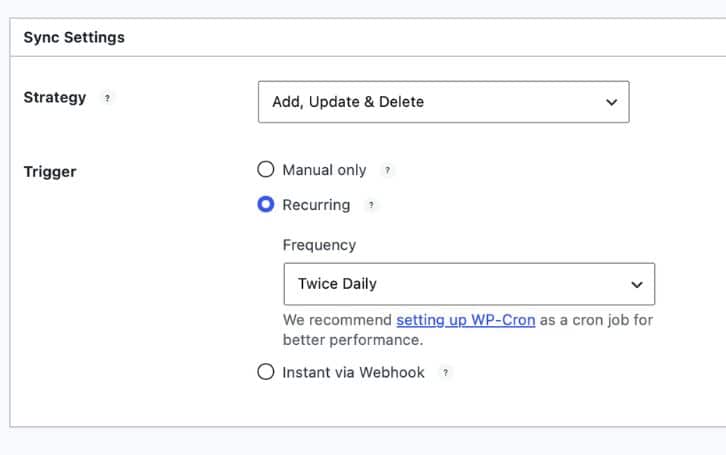
AirWP Sync connects WordPress to Airtable so that each record in a synced table becomes a post on your website.
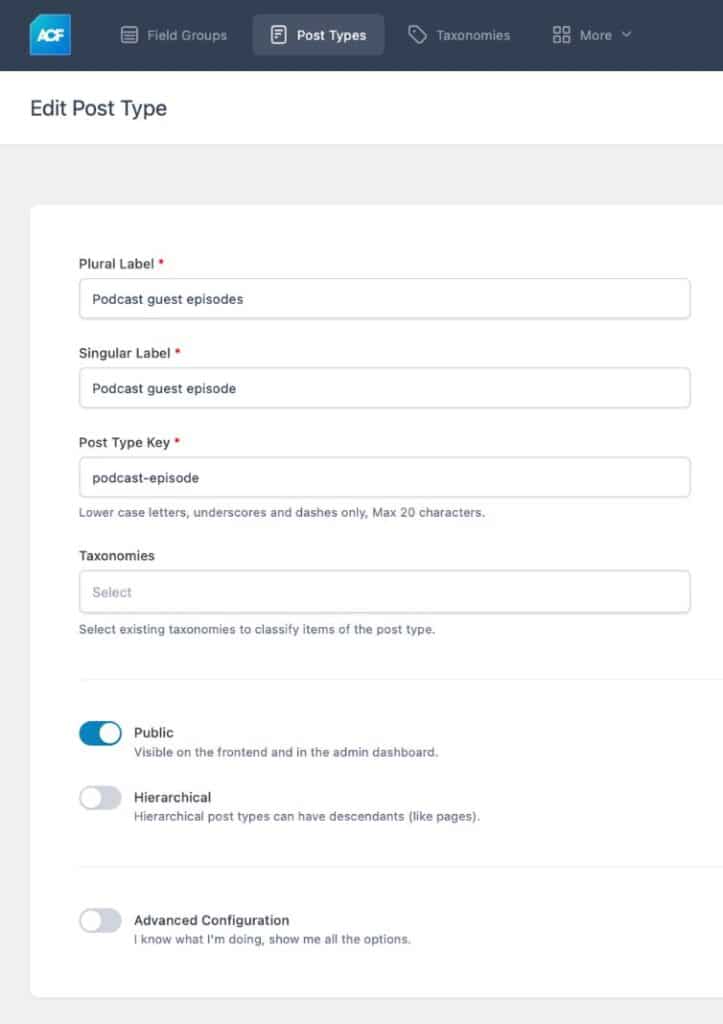
I didn’t want those episodes mixed in with my blog posts, so I used Advanced Custom Fields to create a separate post type just for them.
I assigned custom fields to the custom post type that correspond to the columns in my Airtable base.
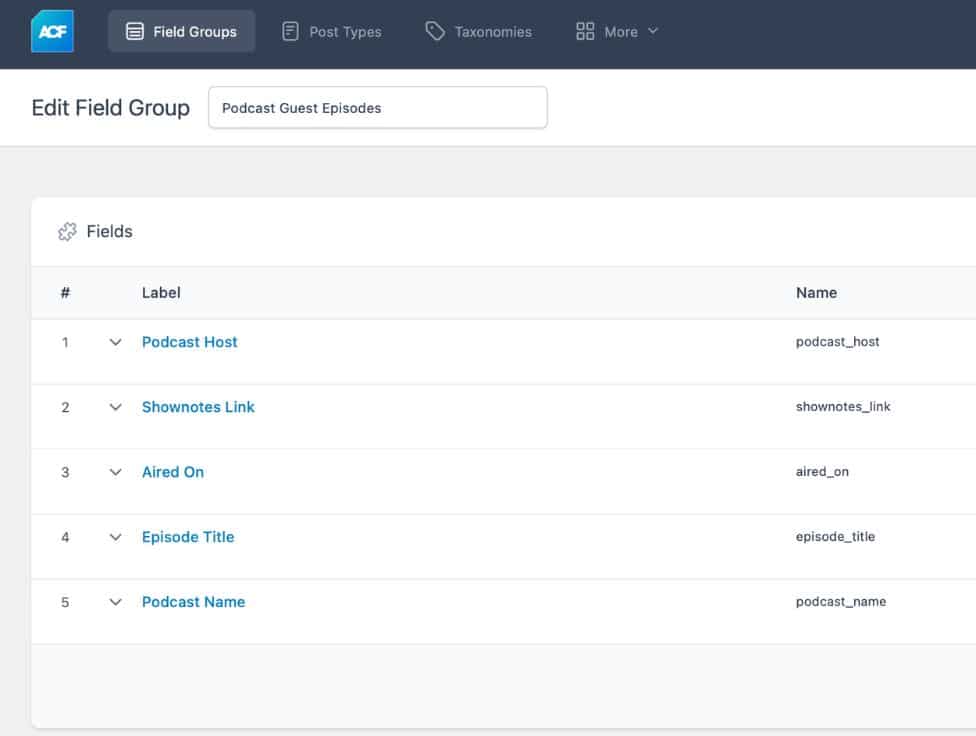
Every column in that Airtable record (episode title, guest name, show description, link to the show notes) can then be imported as a custom field using WP Air Sync. Your Airtable data is now real content living on your server, not a window into someone else’s.
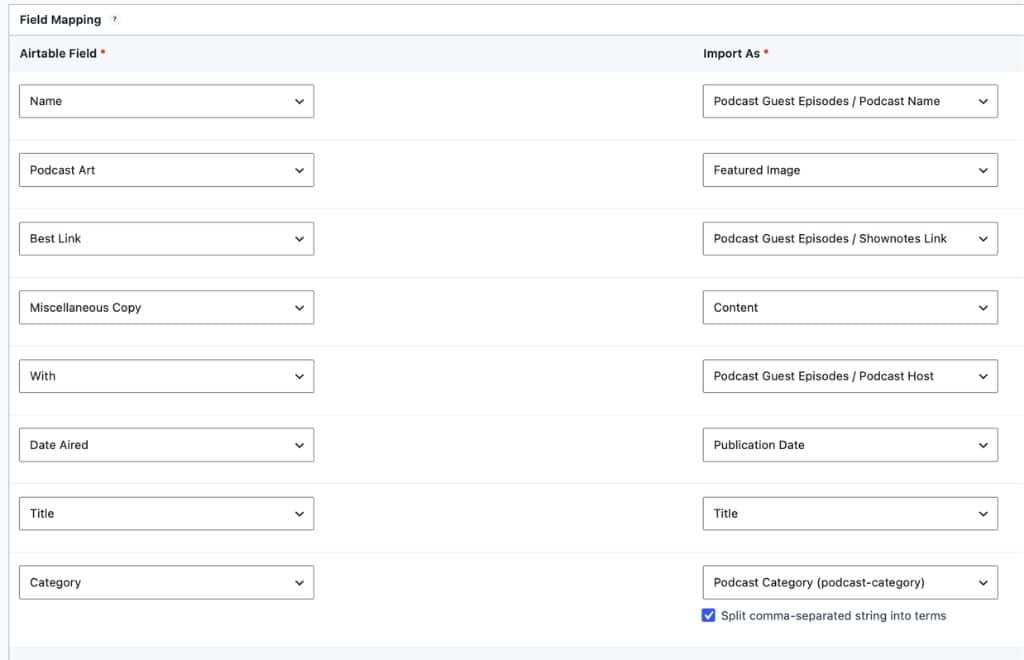
Test Case: Podcast Guest Episode database
I used my guest podcast episode database as the test case. I’d been manually updating that page on my WordPress site for years, and it was six or seven episodes behind because I never had the time to log in and do it.
The Airtable base was always current. The website wasn’t.
Now when I add a new episode to my Airtable, AirWP Sync picks it up and creates a new Guest Podcast Episode post on my site automatically.
On the front end, I built a Loop Grid in Elementor to display the episodes. Each card pulls from the custom fields: the episode title, the host’s name, the topic, the link out to the show notes or podcast player. The page looks like the rest of my site because it is part of my site.
You can see the live result here:

What You Actually Get Out Of It
Two things change when your Airtable content lives on your website instead of inside an embed.
First, it looks like your site. The fonts, the colors, the card layout: all of it matches what a visitor sees on every other page. No jarring spreadsheet dropped into the middle of your design.
Second, and this is the one that matters for SEO: search engines can read every word.
The episode titles, the guest names, the show descriptions, the topics covered: all of that text is real HTML on your website now. Google can index it. Which means it can start working for your SEO.
A directory page that once contributed nothing to your search presence can become a page that ranks for the names of guests, the topics of episodes, the questions your content actually answers.
You’ve already done the work of building something valuable in Airtable. This approach makes sure your website gets credit for it.
Is It Worth It?
Honest answer: it depends on what you’re trying to do.
Embedding an Airtable is fast, free, and requires zero technical setup. If you’re displaying something temporary (a summit lineup that goes away in three weeks, a one-time resource list) embedding is probably fine. The SEO cost doesn’t matter much for content that won’t exist long enough to rank anyway.
But if you’re maintaining something ongoing (a directory, a resource library, a portfolio of work, a running list of podcast appearances) and you want that content to support your visibility in search? The embed is working against you.
The setup I’ve described takes more time upfront. You’ll need to install and configure a couple of plugins, create a custom post type, and build a display template. If you’re comfortable in WordPress, it’s manageable. If you’re not, it’s worth either learning it or handing it to someone who knows their way around your site.
What you get on the other side is content that looks like yours, loads like yours, and actually contributes to your SEO. For anything you’re maintaining long-term, that trade-off is worth it.
If you want more of this: practical SEO thinking for service-based businesses, join The Search Party. It’s my weekly newsletter where I share SEO that’s actually working right now, what’s changing, and what you should probably stop doing.